Disposition Reporting
Just like activating your EEOC / OFCCP, you can enable Disposition Codes via your company settings. For information about enabling and managing disposition codes, please see Managing the EEOC/OFCCP Compliance Feature.
These metrics are also available at the position level-access them in the Reporting screen on each position.
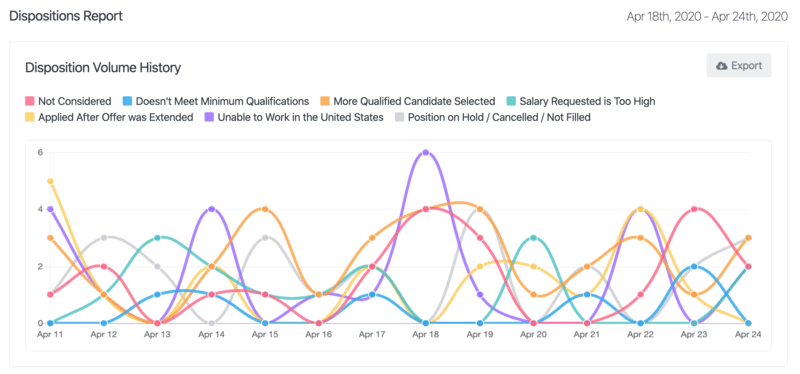
Disposition Volume History
Here, you will see a timeline of the different disposition options you have selected and their corresponding color so you can identify any patterns and volumes over time.
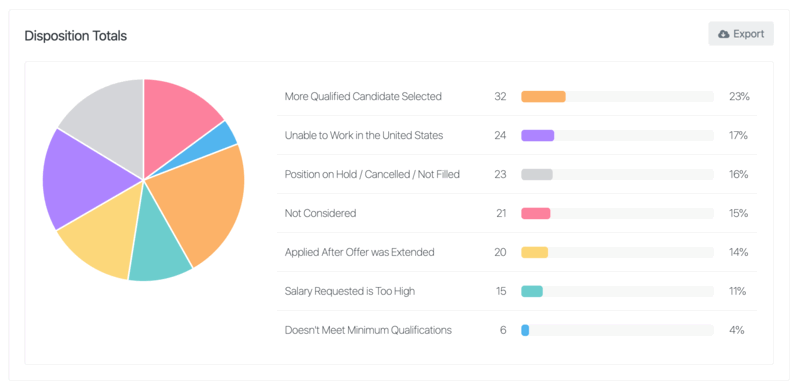
Disposition Totals
This pie chart allows you to see the total breakdown of disposition codes from the time frame that you have selected.
Candidates Disposition Report
Exporting the Candidate Disposition Report CSV data will give you a full report on which candidates were disqualified, disqualification date, what position, disqualified by and reason.

These metrics are also available at the position level-access them in the Reporting screen on each position.
